PNG to PDF Converter
Turn a PNG, JPG or screenshot into a PDF in your browser. No upload, no signup, no watermark - the file never leaves your device.
A PNG to PDF converter wraps an image in a PDF page so it can be emailed, printed or attached where an image file is not accepted. This one builds the PDF in your browser from the image you choose, so nothing is uploaded and there is no watermark.
Runs entirely in your browser · no signup · nothing is uploaded · updated 2026-09-02
or drop it here - the file never leaves your browser
How to use it
- 1.Choose or drop the PNG you want to convert.
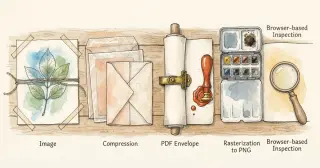
- 2.Set the quality - the image is embedded as a JPEG stream inside the PDF.
- 3.Download the PDF. The page is sized to the image, so nothing is cropped.
Embed this png to pdf on your site
Free to use on any blog, class page or wiki. Paste the snippet and keep the credit line under it.
<iframe src="https://rankcert.com/embed/png-to-pdf" title="PNG to PDF" width="100%" height="600" style="border:0;border-radius:12px" loading="lazy"></iframe>
<p style="font-size:13px">Free <a href="https://rankcert.com/tools/png-to-pdf">png to pdf</a> by RankCert</p>
Frequently asked questions
How do I convert a PNG to PDF without uploading it?
Use a converter that runs in the browser, like this one. The image is decoded on a canvas and the PDF is assembled locally, so the file never reaches a server.
Will the PDF have a watermark?
No. Nothing is added to the page - the PDF contains your image and nothing else.
What page size does the PDF use?
The page matches the image's pixel dimensions at 72 points per inch, so the image fills the page exactly with no borders or cropping.
Can I put several PNGs into one PDF?
Not here - each conversion produces a single-page PDF. To combine them, convert each and merge the PDFs in Preview on macOS or any PDF merger.
Does converting reduce the image quality?
Slightly. The image is stored as a JPEG stream inside the PDF, which is what keeps the file small. Raise the quality slider if you need a near-lossless result.
Why is my PDF so large?
Because a photograph at full resolution is large. Lower the quality slider, or resize the image first - a 4000px wide image is far more than a printed page needs.
Does transparency survive the conversion?
No. PDF pages are opaque, so transparent areas are filled with white. Keep the PNG if you need the alpha channel.
Can I convert a PDF back to PNG?
Yes - use the PDF to PNG converter, which rasterises every page at twice its natural size.
The guide behind this tool
Tools that pair with this one
Image Color Picker
Click anywhere on an image to read the exact colour as HEX, RGB and HSL, and keep a palette of everything you picked. Nothing is uploaded.
Images
PDF to PNG
Render every page of a PDF as a high-resolution PNG in your browser. Nothing is uploaded, there is no page limit and there is no watermark.
Images
PNG to JPG
Convert a PNG to JPG in your browser with a quality slider, and see exactly how much smaller the result is before you download it.
Images
JPG to PNG
Convert a JPG to lossless PNG in your browser, ready for editing, transparency work or any tool that refuses JPEG.
Images