
Remove AI Traces
Live this weekErase hidden AI traces.
About
Uncovering hidden signs of AI in your text can be challenging. This tool quickly identifies and removes unnoticed technical traces, including fingerprints from AI systems, artifacts from machine-generated content, and remnants from common AI tools. No sign-up is required, and operations are completely private, ensuring your text is scanned directly in your browser. Enjoy unlimited free scanning and effortless cleanup to prepare your documents for any audience.
The case
Who it is for
Freelance writers who use AI to draft emails and posts.
What is broken today
When people copy AI‑generated text into documents, the text often carries hidden characters, formatting tags, citation markers, and other artifacts that reveal its AI origin or disrupt formatting. These invisible traces can trigger detection by AI‑detector tools, create layout issues, or leave unintended metadata.
What it does about it
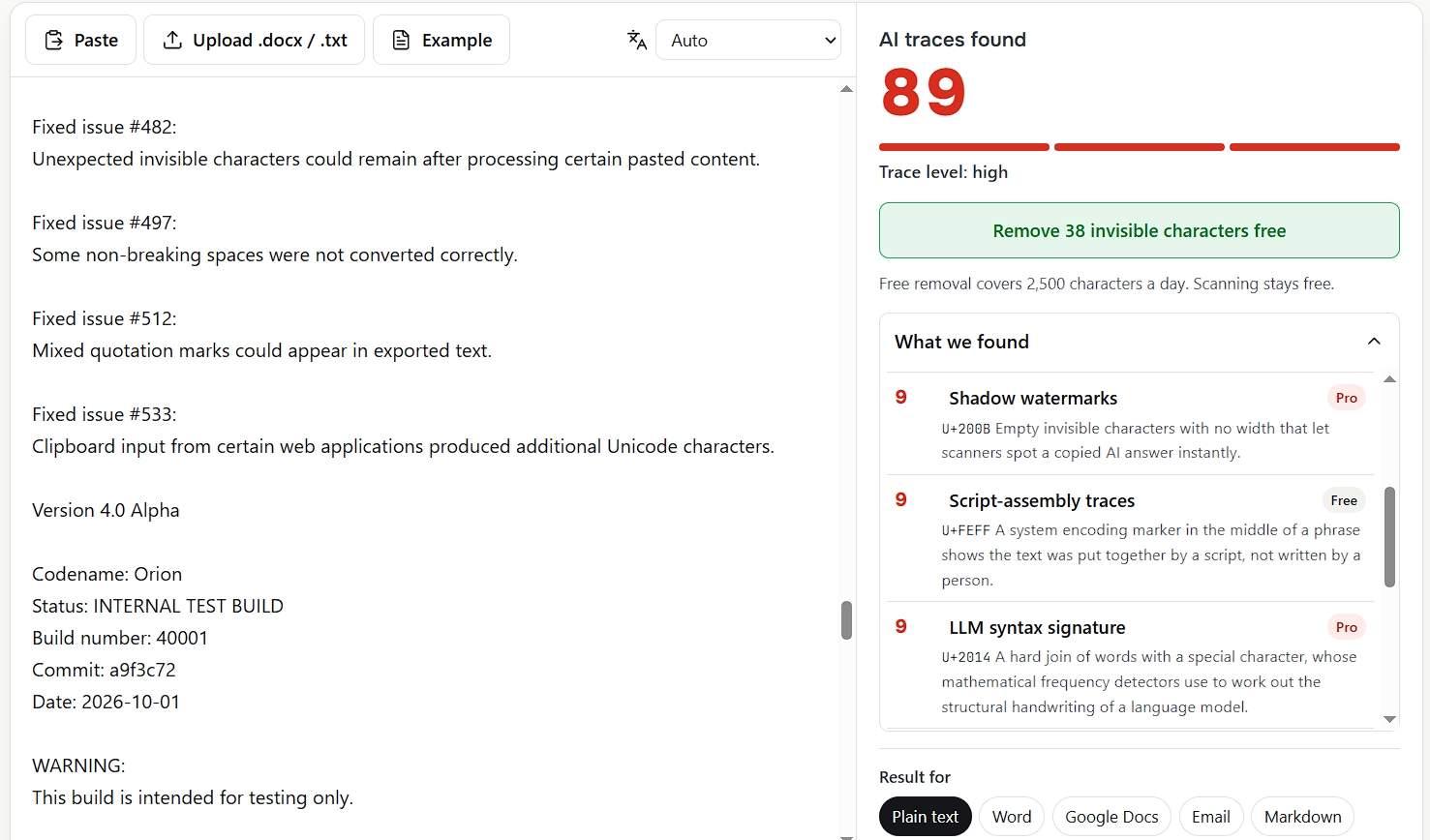
Remove AI Traces scans pasted text or uploaded documents directly in the browser, identifies 17 groups of trace characters and Word metadata, marks them in red with Unicode codes, and removes or replaces them context‑safely. The free scanner handles invisible characters and Markdown up to 2,500 characters per day; the Pro version removes all traces, re‑checks the result, and outputs clean text for Word, Google Docs, email, or plain text.
Why not the obvious alternative
Unlike generic text editors or AI‑detector tools, Remove AI Traces not only flags but automatically removes a comprehensive set of invisible AI traces, preserves document layout and language‑specific typography, and runs entirely client‑side so no content leaves the browser. It also offers a one‑time or subscription Pro plan with context‑aware replacements and re‑checks, without requiring account creation.
Gallery
Details
Questions
- Does my text get uploaded anywhere?
- No. The scan and every fix run on your device. The server only receives a number of characters removed for the free daily limit.
- Does ChatGPT put a watermark in text?
- OpenAI does not add a hidden watermark as a feature. Copied answers still often carry technical traces such as special spaces or utm_source tags.
- Is my text sent anywhere when I pay?
- No. Payment happens in a Paddle window on top of the page. Your text stays in the tab and is fixed right after the payment is confirmed.
- Who processes the payment?
- Paddle, our merchant of record, handles cards, PayPal, taxes and receipts. We never see your card details.
- Can I cancel a subscription?
- Yes. Open your account, then Manage billing. Pro stays active until the end of the paid period and can be cancelled at any time.
removeai85Maker2d
Remove AI Traces is a browser-based scanner that shows and removes hidden AI traces from your text and documents. It runs entirely in your browser so your content never leaves the device. Pay for Pro to remove all traces and get context‑aware formatting.